
Stop guessing,
start fixing.
Collaborative AI that helps mechanics with any question at the machine, and remembers every job. On every vehicle: road, field, site and sea.
Per user, per month. No long contract, cancel any time.


The same account on iPhone, iPad and Android, and in the browser on any computer or tablet.
For every vehicle
Works with the diagnostic tools you already run
- Jaltest
- Texa
- Autocom
- Delphi
- Bosch
- WABCO
- OEM tools
Snap a photo of the tool's screen and Lyxter reads the codes off it: J1939 SPN/FMI · OBD-II · UDS · MID/PID/FMI · brand-specific codes. A code is one way in. A symptom, a part name or a photo of the machine works just as well.
How a job goes with Lyxter.
From the first question to a fix your whole workshop can find again.
Step 1: Ask it, or snap it
Ask whatever has come up: a symptom, a part, where something sits, what the manual says, or the fault code off your tool. Add photos of the dash, the part or the tool's screen. PDFs go in too.
Step 2: Lyxter works the problem
It looks the question up where the answer lives: the Lyxter knowledge base of real problems and fixes from other mechanics, your own manuals, the web, and the machine's own history. On a fault, it says how serious it is and what to check first.
Step 3: See where it came from
When the answer leans on one of your manuals, a chip names the page. Tap it and the manual opens on that page, with the line highlighted. An answer from the web carries the site it came from.
Step 4: Fix it, then say so
Tap whether the fix worked, so fixes that worked are put forward first. On a machine in your fleet, tell Lyxter what you did and one tap saves it to that machine's history.
Step 5: The workshop remembers
Every chat belongs to the workshop, so a colleague can pick the job up. Next time the same machine or the same fault comes in, Lyxter brings back what your shop found.
It speaks your language.
Ask it the way you would ask a colleague: a symptom, a part, a code off the tool. Plain answers, with the page of your own manual they came from.
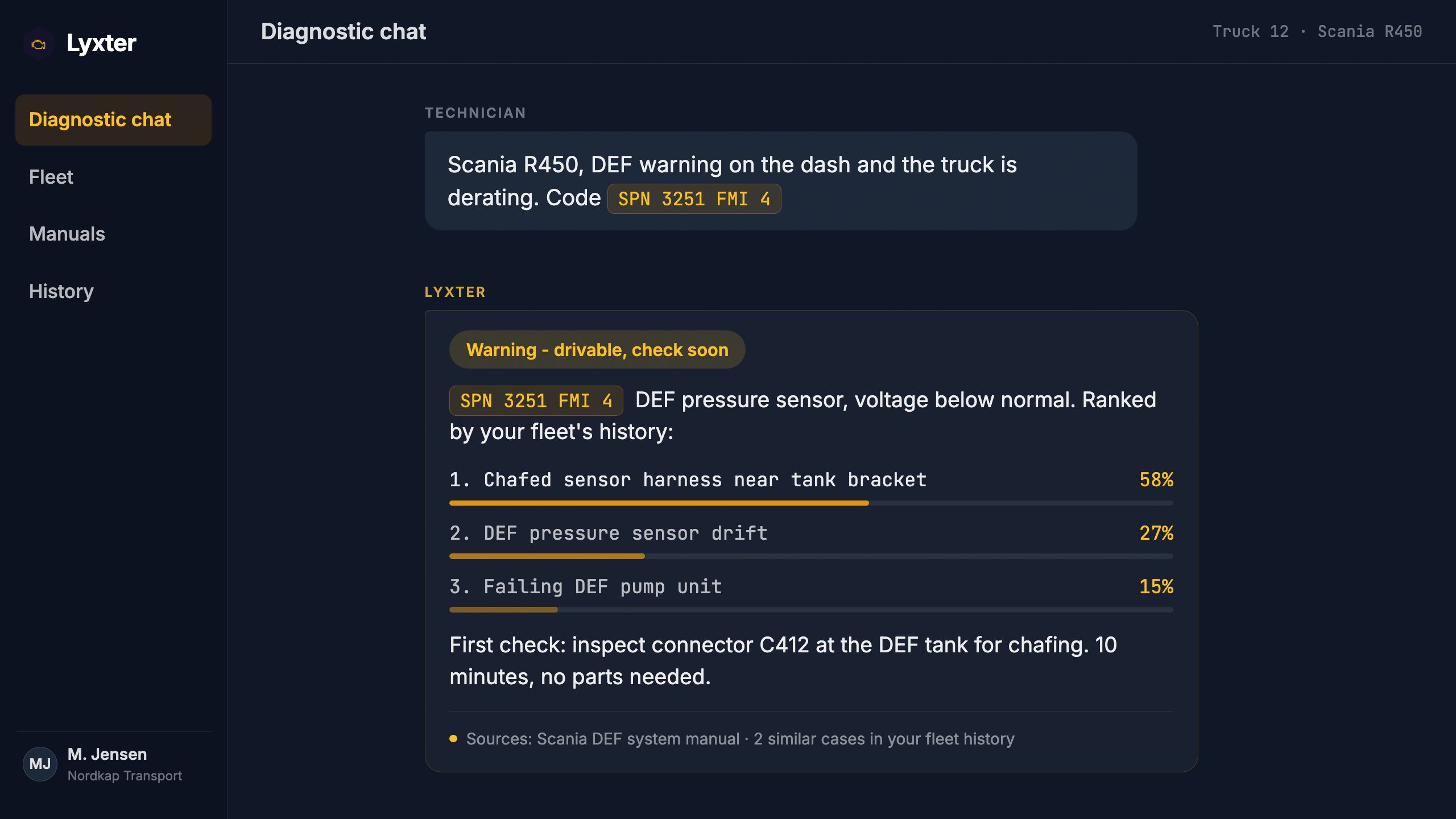
Warning - drivable, check soon
SPN 3226 is the outlet NOx sensor, and FMI 4 means its voltage is below normal. That points at the wiring before the sensor itself. What to check, in order:
- 1The connector at the sensor: green corrosion or a pushed-back pin
- 2The supply at the sensor plug, ignition on: it should read battery voltage
- 3The loom where it passes the turbo heat shield: wiggle it and watch the live value
Most likely cause: a chafed sensor harness at the heat shield.
Your SCR system manual · Wiring· p. 2Save to this machine's history?
RepairNOx sensor loom repaired where it chafed on the heat shield
A senior technician's instinct, on every bay.
Whatever comes up at the machine, Lyxter looks it up where the answer lives and tells you what to do, the way your best technician would.
Ask it anything at the machine
A symptom with no code, a part name, where something sits, the facts on this vehicle, what the manual says, or the fault code off your tool. Fault codes are one question among many.
Fault codes, decoded
OBD-II, J1939 (SPN/FMI), KWP2000 and UDS read back in plain language, with the likely causes ranked, not just a definition.
Severity at a glance
Every diagnosis opens with a clear call: Critical - stop the vehicle, Warning - drivable but check soon, or Info. No judgment calls at 6 am.
It remembers your workshop
Every chat belongs to the workshop, so any mechanic can pick up a colleague's job mid-way. Tell Lyxter what you did on a machine in your fleet and one tap saves it to that machine's history, fault or no fault. Next time the same machine or the same fault comes in, the AI brings back what your shop found. Only ever your company's work, never another workshop's.
It looks where the answer lives
The Lyxter knowledge base of real problems and the fixes mechanics confirmed worked, your own manuals down to one vehicle's, the web, and the machine's own history. Lyxter judges the best source for each question and says what the answer rests on, and proven repairs outrank plausible ones.
Built for the floor
Apps for iPhone, iPad and Android, and the same account in any browser: at the roadside, under the truck or on the bay-side tablet. Photos of the tool screen, the dash or the part stay with the case.
Your whole workshop, on every screen.
Start a case on your phone under the truck and pick it up on the iPad at the bench, or at the desk. One account and one set of chats, shared by the whole team.
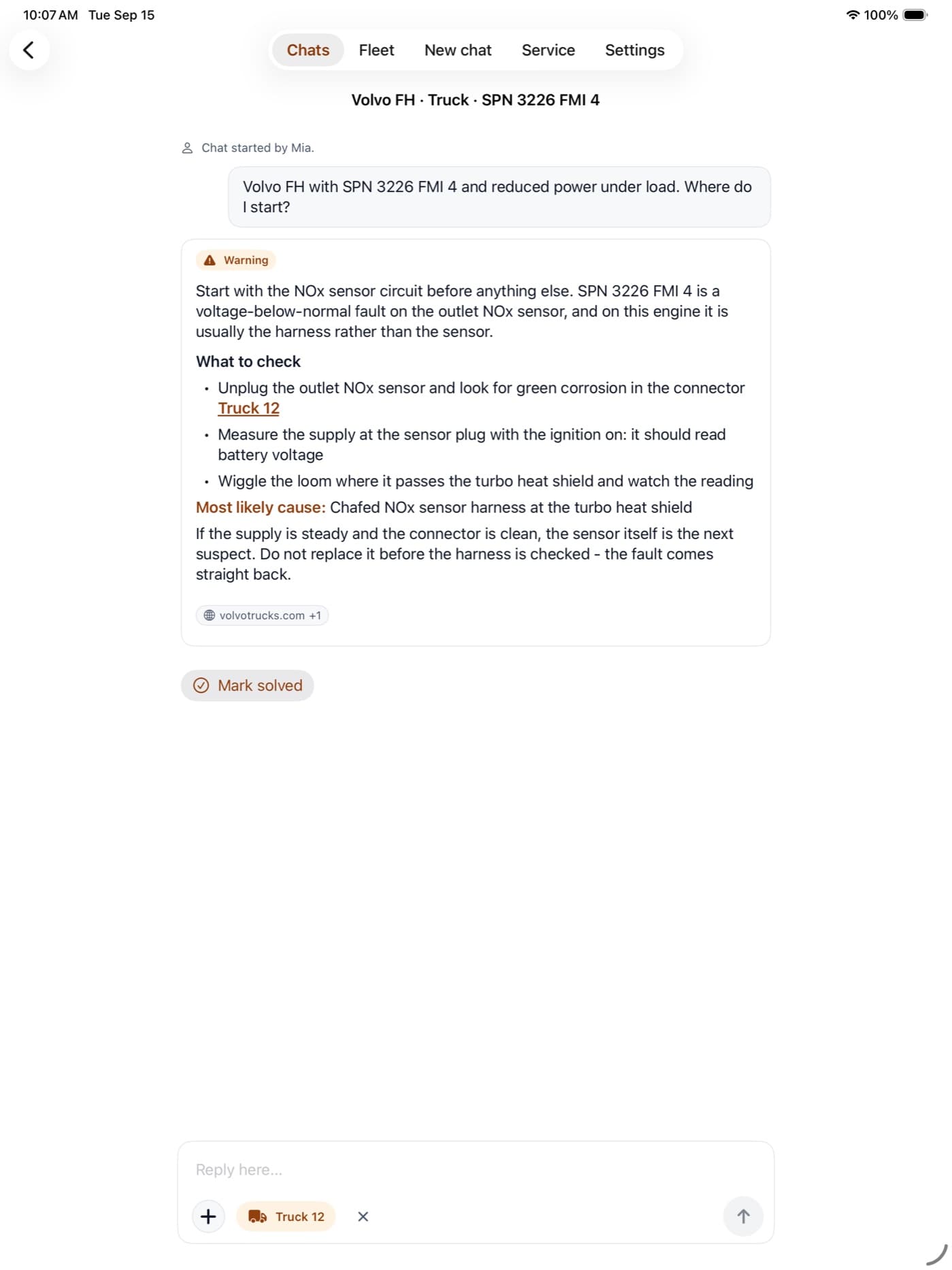
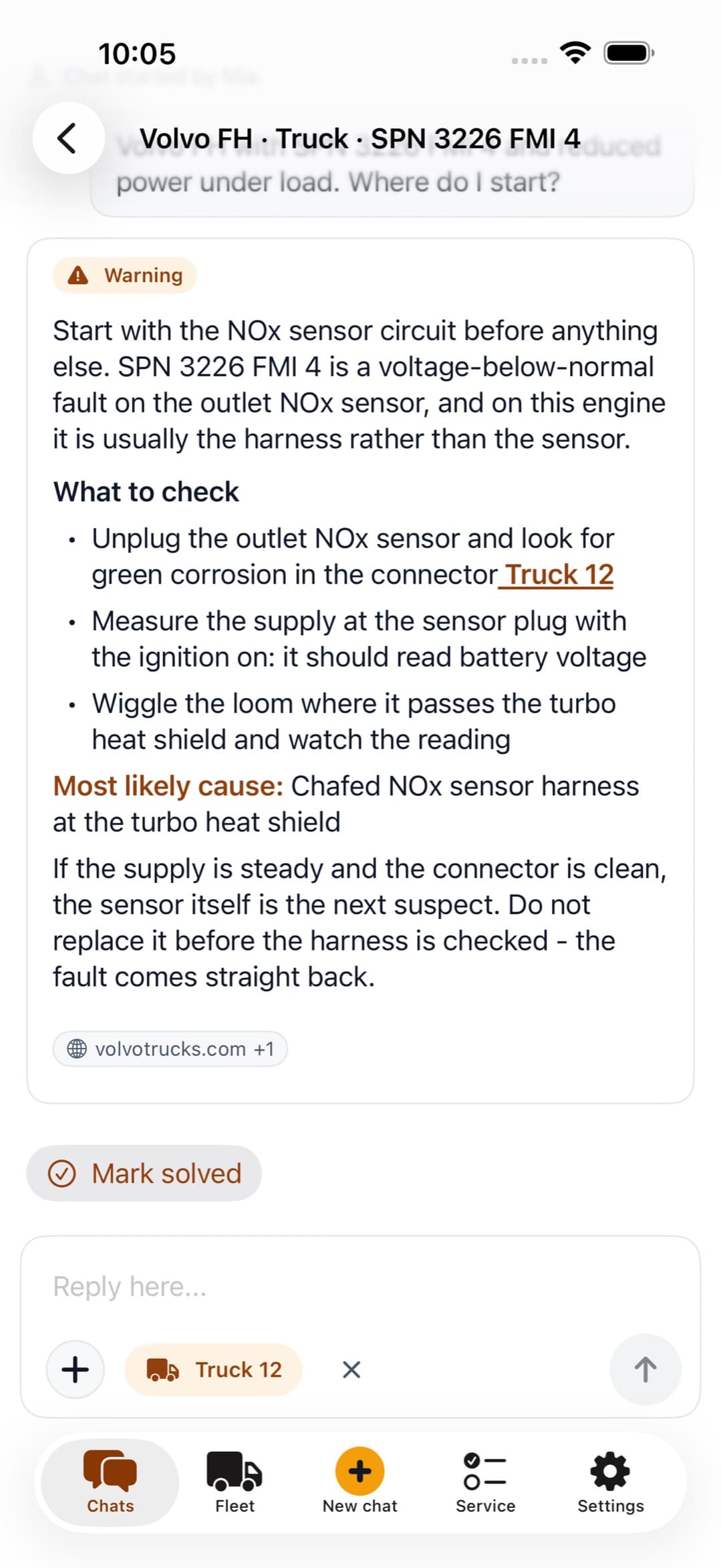
iPhone and iPad
The Lyxter app, from the App Store.
Android
The Lyxter app, from Google Play.
Any computer or tablet
The same account in the browser, at app.lyxter.ai.
The modules
Two modules. One record per machine.
Diagnosis is one part of the job. Fleet keeps every machine you service on file; Service runs and documents the work on it. What one records, the other already knows.
FleetEvery planBeta
Know every machine you service.
Every machine gets its own page: make, model and year, its odometer or engine hours, its own manuals, its chats, and one timeline holding the faults, the repairs and the services with what they cost. Plan the maintenance by months, kilometres or engine hours, and Lyxter mails you when the work comes due.
An illustration of the Fleet list: four machines, each with its make, model and year, its latest odometer or engine-hours reading, and its service status - overdue, due soon, or waiting on a reading - above a short history for one of them.
- Schedules by months, kilometres or engine hours - the tightest one wins
- Email reminders the first time a service crosses into due or overdue
- A critical call in chat flags the machine and opens an issue on it
- Manuals for one machine, used by the AI on that machine only
- Link a chat to a machine and the AI answers with its history behind it
One loop
Finish a service on one of your own machines and the schedule moves on by itself: the reading updates, the reminders stop, and the job lands on that machine's timeline in Fleet.
ServiceEvery planBeta
Run the service. Hand over the proof.
Pick the service type and work the list: tick it, measure it, or leave a note. A measurement past its limit raises its own advisory, progress counts itself up, and anything still blank gets a nudge before you finish. Run it on one of your own machines, or on a customer's truck created right there on the job.
An illustration of a service job: a minor service on a truck, eighteen of twenty-four items recorded, with a brakes section showing a ticked item, a measured pad thickness carrying an advisory, a note, and an item marked not applicable, above a footer offering the report as preview, print or PDF.
- Tick, measure or note - one row for each thing checked
- Starter checklists, from a minor service to an annual inspection
- A report on your own letterhead, in English or Danish
- Only what was actually recorded reaches the report
- Every job searchable by vehicle, customer or job number
Lyxter does not mail the report or publish a link for it - the workshop hands it over itself, from preview, print or PDF. A report records what was checked and the condition observed at the time; it is not a statutory periodic inspection and does not replace one.
Explore ServiceBoth modules come with every plan: up to 3 vehicles on Lite, and no vehicle limit on Pro and Pro Max.
Enterprise-grade by default.
EU data residency
Your data stays in the EU: hosted, processed, and stored inside European infrastructure.
Customer isolation
Your shop's repair history never trains a shared model. The knowledge the AI shares across workshops is general know-how it wrote itself, reviewed by our staff - never your data.
Audit trails
Lyxter says what an answer rests on: a page of your own manual, a knowledge base entry, a web result or an earlier case on that machine.
Ready for the next job?
Set your workshop up today, or inquire for a trial with our team.
Take Lyxter with you.